And an announcement
All blog posts to date
Introduction
First, I have a major announcement to make regarding this myself and this blog going into the future. The announcement is at the end of the post. If you don't want to read a whole bunch about reversing, feel free to skim over this post and get to the bottom.
I've done posts before on reverse engineering apps. I've always covered the commands, so I wanted to do something different. I wanted to do some actual reversing and post the findings. Sounds like fun, right?
Well, yes and no. Yes, reversing is fun (and frustrating). No, reversing may not always be, say, legal. Which leads me to a problem. I would have loved to reverse a major well known app and post the findings here. The problem is something nice called an "End User License Agreement" (EULA). An EULA is a contract between the user of software and the producer of the software. Normally you just skip over the EULA, but I decided to read some on Android apps. Here's a nice little sample from an actual EULA from a major app by a major publisher, under a section called "GENERAL PROHIBITIONS":
Attempt to decipher, decompile, dissassemble or reverse engineer any of the software used to provide the Services or Collective Content.
Basically, no reverse engineering or we'll send our lawyers after you. Lawyers, they just take all the fun out of life, don't they? (I have multiple lawyers in the family and I guarantee they are laughing right now).
So seeing as this blog is called "Free Android Forensics" and there are absolutely no ads, I do not make any money here. I have a PayPal link and I use donations there to maintain my equipment. I would rather not ask for donations to pay my legal bills.
So, scratch that plan. Instead, I decided to reverse ...
Solitaire
Yes, this post is going to be on reversing a Solitaire app. You know, the one player card game packaged with every Windows operating system ever. Well, I found an open source version of Solitaire for Android on a free and open git site. I downloaded it, played it, pulled the compiled APK from my tablet, and reversed it. Why open source? So that way I can't get in any trouble for reversing it! The source is already online.
Here's also why. I want to show the process of reversing, some basic findings, and some makeups of an app. We've all played Solitaire, we all know the makeup of a deck of cards and the game logic, so I figured this would be a good app to show reversing. Everybody should be familiar with Solitaire, so when I show some reversed app source, the logic should hopefully make some sense.
Getting the APK
So let's pretend I didn't download source code and compile an Android app. Let's pretend I am pulling an app I installed on my device from the Google Play Store to my computer to reverse it. First step, get the APK (the actual app file) from the Android device to my computer. And I'll show a lazy way.
Download ES File Explorer (or some other file manager of your choice) to your device. ES File Explorer allows you to copy installed APKs to your SD card. I opened ES File Explorer, went to the app manager, and backed up the Solitaire app. It appeared in a directory on my device at /sdcard/backups. Then I plugged the device into my computer and retrieved the APK using adb.
adb pull /sdcard/backups
Within the pulled files was the Solitaire app. That was easy.
Getting the Android manifest and app version
My first step in reversing an app is always to obtain the manifest and the version of the app. The manifest is the unique name of the app. The version number is just as it sounds. When you have the manifest and the version of an app, you have a unique way of differentiating that app from others. There are many Solitaire apps out there, but only one with a given package name and version number. I have two ways, two different tools to obtain the manifest and version.
First, aapt. If you have the Android SDK installed on your computer, navigate to the build-tools directory and look for the file aapt. Open your terminal and type the following:
/path/to/aapt l -a /path/to/apk > /path/to/manifest.txt
That command runs the tool aapt against the apk file and sends the output to the file manifest.txt. Open the txt file and look for the following:
A: android:versionName(0x0101021c)="1.12.2" (Raw: "1.12.2")A: package="com.exubero.solitaire" (Raw: "com.exubero.solitaire")
These two lines describe the version number (1.12.2) and package name (com.exubero.solitaire).
Second method, apktool. I've done a post on apktool. Feel free to read over it. I downloaded the newest version of apktool, placed it in the same directory as the Solitaire APK, and ran it against the app using the following command:
java -jar apktool_2.3.1.jar d solitaire.apk
The result is a directory called "solitaire" containing a fully dumped version of the app. There is the smali code (Java byte code), all the xml files within the app, all the native libraries used, and all the images/videos/audio clips/any other resource file required.
Within the directory "solitaire" there is a file AndroidManifest.xml. The package name is there. There also is a file called apktool.yml. The version is there.
Resources
By resources, I mean media files, custom fonts, dictionaries, or other extraneous files required to present the app to the user. We can get to resources one of two ways. First, the apk is just a zip file. We can unzip the apk and retrieve resources. Second, we can use apktool as described above to view resources.
I used apktool. Within the solitaire directory is a directory "res" and within that "drawable". I'll highlight a few interesting images for this demonstration. First, a single image containing the font on all the black cards:

There's a red one also. Next, the suit icons.

Here's the logo on a red king card.

There's similar for other face cards. And finally, the actual logo for the app you would see in your device launch tray.

Solitaire is a simple app. Complicated apps could have way more images. There also could be audio and video.
Note on the xml files. The compilation process of an app also compiles the xml files. If you want to see the decompiled xml files from an APK, you have to use apktool. If you unzip the APK and try to look at any xml file, including the manifest, you get junk.
Source code
apktool decompiles the apk to smali, which is java byte code. It is tougher to read than actual java. So let's decompile the app to java. I am using Santoku, a custom version of Linux developed for free by the company NowSecure which contains built-in mobile forensics tools. It contains dex2jar and jd-gui. I'll describe both as I use them for the Solitaire app. You also can Google these tools and download them. They can run in Linux and Windows. I prefer Linux personally. I also previously wrote a post on this process.
First, let's use dex2jar. Within an Android apk file is a file called classes.dex. That file is the compiled source code. It is the actual executable part of an app. It contains all the logic that makes the app run and codes the app's behaviors. dex2jar converts the classes.dex into a Java JAR (Java Archive) file, which you can decompile using your Java decompiler of choice. The syntax for dex2jar is as follows:
Now we use a decompiler to view the resultant jar file. I use JD GUI as it is built in to Santoku. The line to open the jar in JD GUI is as follows:
Here are some quick findings. First, the coder defined what a card is. So there is an object called "Card."

As you can see, the developer defined all four suits (hearts, diamonds, clubs, and spades) and the face value cards (jack, queen, king, and ace).

Above are public functions getSuit and getValue. Other classes can call these functions within the class Card to do logic based on what card it is.

Here is logic that is part of dealing. There are seven stacks of cards to move around in order to reveal the hidden cards and ultimately move all the cards into four stacks of face values. The logic above has seven card "anchors" where a card can be added.

Speaking of dealing, there's shuffling. The deck is shuffled three times to ensure randomness.

And above is the actual shuffling logic.

The above shows some important functions. As you know in Solitaire, when you are moving cards among the seven stacks, you can put a red card onto a black or a black onto a red. But you can not put a black onto a black or a red onto a red. You see a function called "isSuitsOppositeColours". And the objective is to get four stacks of the face values - all thirteen hearts in a stack, all thirteen diamonds, etc. So there is a function called "isSuitsEqual". These functions are called to compare two cards to see if they can be stacked on top of each other for a given context.

When the user wins, the above edits a file to update the statistics. In the app's directory within /data/data, there is a file SolitairePreferences.xml in the shared_prefs directory. The code above has an integer called j. This gets the fastest time as stored in the SolitairePreferences.xml file. The line as follows:
My tablet is rooted, so I was able to retrieve the app's data files. Here is what that xml file looks like:


Summary
There also is a directory within res called "layout". This directory contains xmls describing any given screen the user could see. If you've ever written an Android app in either the old Eclipse or the current Android Studio, you may have played with the app layout editor. When you create a layout for a screen, you actually are creating an xml file. Here is an entry in the file stats.xml, which describes the stats screen you can see of your game usage.
<TextView android:textSize="20.0sp" android:gravity="center" android:id="@id/text_best_time" android:focusable="true" android:layout_width="fill_parent" android:layout_height="wrap_content" android:text="@string/solitaire_layout_text_text" />This line describes a text box called "text_best_time", which would presumably display the best playing time the user has ever achieved in Solitaire.
Note on the xml files. The compilation process of an app also compiles the xml files. If you want to see the decompiled xml files from an APK, you have to use apktool. If you unzip the APK and try to look at any xml file, including the manifest, you get junk.
Source code
apktool decompiles the apk to smali, which is java byte code. It is tougher to read than actual java. So let's decompile the app to java. I am using Santoku, a custom version of Linux developed for free by the company NowSecure which contains built-in mobile forensics tools. It contains dex2jar and jd-gui. I'll describe both as I use them for the Solitaire app. You also can Google these tools and download them. They can run in Linux and Windows. I prefer Linux personally. I also previously wrote a post on this process.
First, let's use dex2jar. Within an Android apk file is a file called classes.dex. That file is the compiled source code. It is the actual executable part of an app. It contains all the logic that makes the app run and codes the app's behaviors. dex2jar converts the classes.dex into a Java JAR (Java Archive) file, which you can decompile using your Java decompiler of choice. The syntax for dex2jar is as follows:
d2j-dex2jar solitaire.apkThe result is a file called solitaire-dex2jar.jar. Note, you also can unzip the apk, retrieve the file classes.dex, and run dex2jar against classes.dex.
Now we use a decompiler to view the resultant jar file. I use JD GUI as it is built in to Santoku. The line to open the jar in JD GUI is as follows:
jd-gui solitaire-dex2jar.jarThen the tool JD GUI opens up to view the Java source. Pretty nifty.
Here are some quick findings. First, the coder defined what a card is. So there is an object called "Card."
As you can see, the developer defined all four suits (hearts, diamonds, clubs, and spades) and the face value cards (jack, queen, king, and ace).
Above are public functions getSuit and getValue. Other classes can call these functions within the class Card to do logic based on what card it is.

Here is logic that is part of dealing. There are seven stacks of cards to move around in order to reveal the hidden cards and ultimately move all the cards into four stacks of face values. The logic above has seven card "anchors" where a card can be added.

Speaking of dealing, there's shuffling. The deck is shuffled three times to ensure randomness.
And above is the actual shuffling logic.
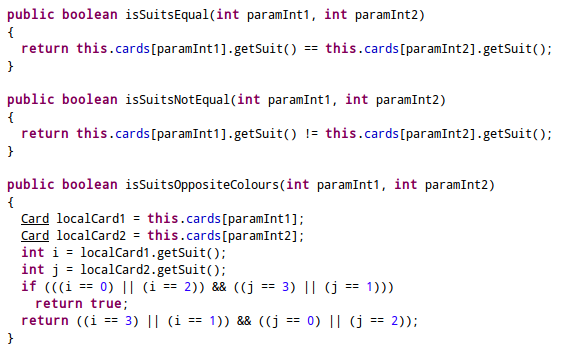
The above shows some important functions. As you know in Solitaire, when you are moving cards among the seven stacks, you can put a red card onto a black or a black onto a red. But you can not put a black onto a black or a red onto a red. You see a function called "isSuitsOppositeColours". And the objective is to get four stacks of the face values - all thirteen hearts in a stack, all thirteen diamonds, etc. So there is a function called "isSuitsEqual". These functions are called to compare two cards to see if they can be stacked on top of each other for a given context.
When the user wins, the above edits a file to update the statistics. In the app's directory within /data/data, there is a file SolitairePreferences.xml in the shared_prefs directory. The code above has an integer called j. This gets the fastest time as stored in the SolitairePreferences.xml file. The line as follows:
if ((j == -1 || (this.elapsed < j))checks to see if the win just now took less time than the fastest as recorded in the xml file. Or if the fastest recorded is -1, that means the win just now was the first win.
My tablet is rooted, so I was able to retrieve the app's data files. Here is what that xml file looks like:
<?xml version='1.0' encoding='utf-8' standalone='yes' ?><map> <boolean name="SolitaireDealThree" value="false" /> <boolean name="PlayedBefore" value="true" /> <boolean name="SolitaireSaveValid" value="false" /> <int name="SolitaireNormalDeal1Score" value="0" /> <int name="LastType" value="1" /> <int name="SolitaireNormalDeal1Attempts" value="19" /> <int name="SolitaireNormalDeal3Score" value="0" /> <int name="SolitaireNormalDeal1Wins" value="10" /> <int name="SolitaireNormalDeal1Time" value="213768" /></map>
The entry "SolitaireNormalDeal1Time" is the fastest time (in milliseconds). So if the value this.elapsed, or the time required to win the game in milliseconds, is smaller than 213768, the new value of SolitaireNormalDeal1Time will be the current time.elapsed.

If you remember above, I mentioned there was a stats.xml file which describes the layout of the stats screen. The logic above fills in the best time time. The integer k is the fastest time as read from the SolitairePreferences.xml file. The value i1 will be the number of minutes and n will be seconds. This logic can take the fastest time from the xml file (213768) and turn it into minutes and seconds (3 minutes 33 seconds).

And there's a screenshot of my stats view. Don't judge.
And there's lots more you could find by reversing the app. Reversing is a rabbit hole. It always keeps getting deeper.
Big picture
So admittedly reversing a game is not very useful. If you are conducting an investigation and you spend your time reversing somebody' solitaire game, you are probably wasting a lot of time.
Here's the thing. If you are investigating a device and you see some data associated with an app that could be interesting but you cannot explain the meaning of that data, you may need to do some reversing. The processes, tool, and techniques in this post can work on any app out there. You can take an APK file, reverse it to source using dex2jar and a decompiler such as jd-gui, and then go hunting through the Java to find logic that creates said interesting data. You can use apktool to get the xml files to compare against the Java source code. Then you can figure out what that data means. Just expect way harder to find results and way more time spent than in a simple Solitaire app. The methods are straight forward. The analysis can be quite advanced. And frustrating.
Announcement
So here's my announcement, and it is a major one. I often talk about my wife, and sometimes my cat. That's my family. Well, that's all changing. My wife is pregnant! We're going to be parents!
So what does that mean going forward? Well, lots. Everything in my life is going to be changing. What does that mean for this blog? I do this blog in my free time. My free time is right now spent approximately as follows:
- playing video games
- hacking around with phones and computers
- playing video games
- going for bike rides and runs
- playing video games
- watching football
- playing video games
- spending time with my wife which often involves ...
- playing video games
- working on my car
- playing video games
- changing diapers
- freaking out about everything sharp or poisonous in my house thus baby proofing everything
- changing diapers
- attempting to get an hour or two of sleep
- changing diapers
- cleaning up barf
- changing diapers
- checking on a crying child which often will lead to ...
- changing diapers
- taking pictures of absolutely everything
- changing diapers.
Point is, I may not have as much time to devote to this blog as normal going forward. No I'm not retiring, no this blog is not going away, and yes you'll still be able to reach me for questions. I just will probably be around a bit less.
Exciting news!
- There are many tools out there for reverse engineering Android apps
- Check out the app's code and correlate findings with files in the res/ directory and data files created by the user
- Code review can help make sense of user-generated files
- The process for reverse engineering a simple app is the same as a complicated app
Questions, comments? Good parenting advice? Leave a comment below, or send me an email.

I scrolled to the bottom, cuz I hoped the announcement was going to be what it actually was. Congratulations to you & Sophia!!
ReplyDeleteCongrats again to you and Sophia! But I do think you'll find you need to insert a few more "changing diapers" in the list of free time activities.
ReplyDeleteThis is really interesting, you are such a great blogger about the Best Phone Monitoring App Free
ReplyDeleteIf you're unsure whether your salary structure adheres to Maharashtra's latest professional tax rules, the P.Tax list of Maharashtra gives you accurate data to avoid penalties.
ReplyDeleteClear and practical explanation of APK reversing — especially the manifest part; I also share insights on web platforms here https://vegaamovieshd.com/vegamovies-web/
ReplyDelete.
I know the place to download RTS TV APK
ReplyDeleteExcelente análisis, este tipo de revisiones detalladas permiten comprender mejor cómo funcionan las aplicaciones y qué información puede ser relevante desde una perspectiva forense. Un contenido muy útil para quienes trabajan o estudian investigación digital
ReplyDelete___________________________________________________
Experto en Identificación y Ficha Decadactilar
This is an interesting technical post that provides useful insights into application analysis and modern software technologies.
ReplyDeleteIt is valuable to see how developers can explore applications and understand the technologies behind them.
In healthcare, healthcare software helps organizations manage information and streamline their daily workflows.
An HMS Hospital Management System can simplify patient registration, appointments, billing, and administrative operations.
A clinic management system can help clinics manage schedules, patient records, billing, and routine activities efficiently.
A hospital information system can centralize important healthcare data and improve communication between departments.
A Laboratory Information Management System can support sample tracking, test processing, results management, and laboratory reporting.
Secure application development is important for protecting sensitive information and maintaining reliable healthcare workflows.
Modern technologies can reduce manual processes and help healthcare professionals manage information more effectively.
Overall, well-designed healthcare software can support efficient, secure, and connected healthcare operations.
healthcare software
HMS Hospital Management System
clinic management system
hospital information system
Laboratory Information Management System
This is a very informative post for anyone interested in Android application analysis and reverse engineering.
ReplyDeleteI found the step-by-step explanation of APK files, manifests, resources, and source code particularly useful.
The examples using a Solitaire application make the technical concepts easier to understand and follow.
A ui/ux design agency in usa can also benefit from understanding how application structure supports the overall user experience.
A mobile app development company in new york can use this type of technical knowledge when testing and analyzing Android applications.
Similarly, mobile app development houston projects can benefit from careful attention to application structure and data handling.
A mobile app development company in Chicago can apply these concepts when troubleshooting or examining application behavior.
For a mobile app development company in Austin, understanding APK resources and application logic can provide valuable development insights.
Professional mobile application development in usa requires attention to functionality, security, usability, and reliable application architecture.
Overall, this article provides a practical introduction to Android app analysis and shows how deeper technical investigation can reveal how an application works.
ui/ux design agency in usa
mobile app development company in new york
mobile app development houston
mobile app development company in Chicago
mobile app development company in Austin
mobile application development in usa
This is an interesting and informative post for readers who want to explore Android applications and understand more about app technology.
ReplyDeleteThe detailed discussion provides useful technical insights for developers and technology enthusiasts.
Learning about application structure and functionality can help developers improve their development knowledge and problem-solving skills.
Businesses can also benefit from professional website development services in Pune when building responsive and reliable digital platforms.
A website design company in Lucknow can create clean and attractive layouts that make websites easier to navigate.
Professional website designing services in Surat can help businesses develop modern and mobile-friendly online experiences.
Experienced website development companies in Mumbai can provide customized web solutions for different business requirements.
A skilled user experience design agency can focus on usability, navigation, and smooth interactions across digital platforms.
Businesses can also work with a website designing company in Noida to create professional and responsive websites.
Overall, combining technical development knowledge with effective web design can help create useful, accessible, and engaging digital experiences.
website development services in pune
website design company in Lucknow
website designing services in Surat
website development companies in Mumbai
user experience design agency
website designing company in Noida
This is an interesting article that provides useful insights into mobile applications and how technology continues to evolve.
ReplyDeleteThe discussion highlights how well-designed apps can make complex processes easier and more accessible for users.
In healthcare, an HMS Hospital Management System can help organizations manage patients, appointments, departments, and workflows efficiently.
Modern clinic management software can simplify scheduling, patient records, billing, and administrative tasks.
Hospital Management Software can support better coordination across departments and improve operational efficiency.
A Laboratory Information Management System can help laboratories organize test data, samples, and day-to-day workflows.
Revenue Cycle Management Software can streamline billing, claims, payments, and other financial processes for healthcare providers.
Home Health Care Software can assist care teams with coordinating services, patient information, and daily care activities.
Mobile-friendly healthcare solutions can further improve accessibility and provide convenient digital experiences for users.
Overall, the article offers a good perspective on how application technology can support practical solutions across different industries.
HMS Hospital Management System
clinic management software
Hospital Management Software
Laboratory Information Management System
Revenue Cycle Management Software
Home Health Care Software
This is a useful and informative post for readers interested in Android applications, app development, and modern digital technology.
ReplyDeleteThe detailed explanation offers practical technical insights that can help developers and technology enthusiasts better understand how applications are structured and how different functionalities work.
Understanding application architecture, development processes, and functionality can also help developers strengthen their technical knowledge and improve problem-solving skills.
Businesses looking to establish reliable digital platforms can benefit from professional website development services in Pune for creating responsive, scalable, and user-friendly websites.
A website design company in Lucknow can help businesses develop visually appealing layouts with clear navigation and an improved browsing experience.
Professional website designing services in Surat can support businesses in building modern, responsive, and mobile-friendly websites that work smoothly across different devices.
Experienced website development companies in Mumbai can deliver customised web development solutions based on specific business goals, functionality requirements, and target audiences.
A skilled user experience design agency can improve usability, navigation, accessibility, and overall interaction across websites and other digital platforms.
Businesses can also work with a website designing company in Noida to create professional, responsive, and engaging websites that support their online presence.
Overall, combining strong technical development knowledge with effective website design and user experience practices can help businesses create accessible, reliable, and engaging digital experiences.
website development services in pune
digital marketing company in Lucknow
website designing services in Surat
website development companies in Mumbai
user experience design agency
website designing company in Noida